Design your gallery wall. Perfectly coordinated

Design your gallery wall. Perfectly coordinated

Plan entire gallery walls in the WhiteWall Configurator and see how your composition will look in the room before placing your order.

Create now

At a glance: Design, combine, compare

Whether it’s two photographs displayed as a duo, a series arranged in a clear linear format or a dynamic salon-style arrangement: arrange multiple images on the wall at the same time and see immediately how they work together.

Your benefits:

  • Combine images freely

  • Choose formats, materials and frames individually

  • Check the arrangement, spacing and overall dimensions at a glance

Step by step, you can create a gallery wall that is individually tailored to your photographs and precisely adapted to the available space.

You can select multiple images for your wall display as early as when uploading your images. Alternatively, you can add more images in the Configurator using the “Add” button in the top left.

Create now
The white arrow points to the “Add” button in the configurator, which opens the multi-product configurator next to the framed image.

Configure multiple images – Your options

The WhiteWall Configurator now offers you even more possibilities when designing and selecting your wall art. Use the combined view to plan complete wall displays, compare different options directly or arrange multiple pieces for a single room.

WhiteWall online editor displaying multiple colorful photos arranged on an interface with a settings panel on the right.
WhiteWall online editor showing three framed prints of a person standing before a blurred yellow train, in black, wood, and white frames.
WhiteWall online editor showing four framed photos: yellow umbrella, red bicycle, blurred yellow train, and yellow building courtyard. Same frame, different motif.
1/3

Create a gallery wall

Combine different images into a harmonious overall composition and see immediately how formats, spacing and framing work together.

Compare variants directly

Which frame best complements your image? Which format creates the desired effect? Place different options side by side and compare their impact directly on the wall.

Plan multiple pieces of wall art together

Configure multiple pieces of wall art with different images in a shared view. Each image can be customized individually and then ordered together with your entire selection.

Plan precisely – down to every detail

Magnetic guides help you align edges and center points with precision. When working with multiple photographs, the spacing between the images is also displayed.

You can also keep an eye on the overall dimensions of your composition – allowing you to check during the design process whether your gallery wall fits the available wall space.

A gallery-wall editor interface displaying six yellow-themed images including a subway, bicycle, building, umbrella, and teal wall.

Simple and easy: Save your designs. Try out different variations.

Save your gallery wall to your account and easily continue designing it later. You can also copy existing compositions and customize them individually – ideal for creating different variations, comparing them or discussing them together.

You can find your saved designs in your account under “Wall Art”.

An UI screenshot showing a "Gallery Wall 1" dropdown menu highlighted in green with an arrow pointing to it.
How it works
1. Select images

Upload your photographs and select the images for your gallery wall. The selected images will appear together in the room view.

2. Add wall art

Expand your composition with additional images. Each piece of wall art can then be configured separately.

3. Customize individually

Define the format, material, framing and other product options for each image.

4. Arrange images

Position your wall art freely within the room view. Automatic guides help you align your wall art with precision.

5. Refine your composition

Add, remove or modify individual pieces of wall art until the images, formats and arrangement achieve the desired overall effect.

6. Review the overall effect

View your gallery wall as a whole and from different perspectives, and check how the images, proportions and arrangement work together.

FAQ – Frequently asked questions about the configurator

What is the WhiteWall configurator?

With the WhiteWall Configurator, you can configure multiple pieces of wall art at the same time and view them together. This makes it easy to create individual wall displays or compare different materials, formats and framing options directly with one another.

Can I come back and edit my configuration later?

Yes. You can save your composition, open it again later and continue editing it. You can also create and modify copies to compare different variations with one another.

Which file formats does the Configurator support?

For wall art, you can upload files in JPG, TIFF and HEIC formats. Various RGB profiles such as sRGB or Adobe RGB are supported, as well as 8-bit and 16-bit colour depth.

Can I combine different formats in a gallery wall?

Yes. You can choose the formats of your wall art individually and combine different sizes within a single composition.

Can I combine different materials and frames?

Yes. Each piece of wall art can be configured individually. This allows you to combine different materials and framing options within a single gallery wall and directly assess how they work together.

Can I check the spacing between my images?

Yes. When you have multiple pieces of wall art, the WhiteWall Configurator displays the spacing between the images. Magnetic guides also make it easier to align them precisely.

Can I see how large my entire gallery wall will be?

Yes. The overall dimensions of the wall display are shown directly. This allows you to check whether the planned composition fits the available wall space.

How do I create a wall arrangement? Inspiration for you

Von Yella Roth

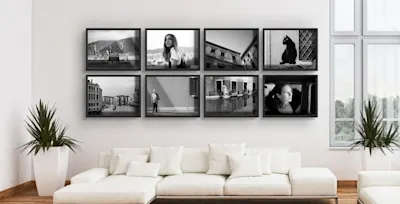
Eight black and white pictures in black frames on the wall above a white sofa with cushions, two plants to the side.

How to hang pictures – 15 tips for your gallery wall

How can you hang your own pictures and arrange them into a stylish gallery wall? Whether holiday photos, landscape shots, family portraits or art prints: your favourite artworks and pictures make your home feel cosy and give it a unique ambience. They deserve a stylish presentation!

Submitted by WhiteWall expert Katharina Wergen

Two people walk along a narrow embankment with railroad tracks into the sea under a blue sky.

Hanging ideas for travel photos: How to turn your travel photos into real works of art for your walls

Your travel photos deserve more than just a place in the cloud: turn special moments into real works of art for your home. Discover how you can present your experiences in style and with a personal touch on your walls with creative hanging ideas, the right choice of image and high-quality WhiteWall products – from acrylic glass to aluminum Dibond to Fine Art Prints.

Submitted by WhiteWall expert Jan-Ole Schmidt

Three photos framed behind acrylic glass on a wall above a dining table with six chairs.

Tips for lovers of photo decorations

From the perfect material to harmonious hanging: discover our expert articles on stylish home design. Learn how to combine photo art, trends, and individual arrangements for an impressive wow effect.

Services, Products & Consultation

B2B

B2B customer holding a framed print

B2B Customer Portal

Whether you're a professional photographer, gallery, reseller, or interior designer – our B2B area offers tailored services, exclusive terms, and personal consultation for demanding projects and professional needs.

Products

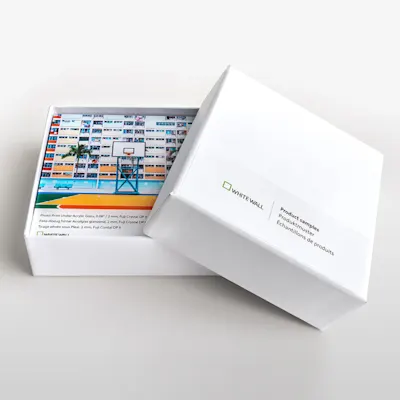
White box with open lid shows colorful printed product samples from WhiteWall.

Product samples

Experience our product firsthand and discover the perfect presentation for your photography. Our product samples allow you to compare the individual properties of our different materials.

Digital consultation

Woman with headset shows samples in video call in front of computer with product advice.

Digital consultation

Let our experts give you comprehensive advice about our products in a virtual appointment.